


The 20-minute lab that took me 42
What my first run through MISP actually taught me — including the 22 minutes I'd rather not admit to, because that's where the learning was.
The module said 20 minutes. It took me 42.
I'm not going to pretend otherwise, because the extra 22 minutes are the whole point of this post. That's where the learning was. I got confused, clicked the wrong things, almost answered a question wrong, and found a bug in my own search technique that a decade of working with data should have caught sooner. Every one of those detours taught me something a clean run would have hidden.
The lab was Introduction to MISP — the Malware Information Sharing Platform — and it's the entry module for the IP Reputation Analysis skill. Here's why it's worth your time, where I ran into trouble, and how I'd tell you to prove you actually learned it.

Certificate of completion — the receipt.
Why · it's on the job req
The vocabulary the job description assumes you have
Before the hands-on part, the module grounds you in terms that SOC job descriptions take for granted:
CTI (Cyber Threat Intelligence): the IoCs and MITRE TTPs teams share to detect attacks faster.
TLP (Traffic Light Protocol): the rules for how shared intel can be redistributed. You'll see it tagged on real data as tlp:white, tlp:amber, and so on.
TIP (Threat Intelligence Platform): the category MISP belongs to. A TIP centralizes and indexes intel, correlates it across sources automatically, integrates with your SIEM/EDR through an API, and automates sharing.
That last piece is the pitch. Without a platform, sharing an indicator means two people agreeing on a channel, agreeing on a format, and hand-loading IoCs into a SIEM one at a time. A TIP automates all of it.
This isn't a "nice to know" lab. It maps to a named NICE work role — Cyber Defense Analyst — and to the MITRE D3FEND technique D3-IPRA (IP Reputation Analysis). One 20-minute module lists eight distinct skill outcomes. When a lab is mapped to the same frameworks recruiters and government contractors write their job reqs against, that's the difference between "I did a training" and "I built a skill that sits somewhere specific in the job market."
Where · I actually learned it
The messy middle
The data model clicked fast
MISP is built on two ideas: events and attributes. An event is context — a security investigation, a threat-actor writeup. Attributes are the actionable IoCs inside it: IPs, domains, URLs, hostnames. The event tells you what it's about; the attributes are what you export into a SIEM or firewall.
If you've spent years modeling context around actionable data, this shape is familiar: a parent record carrying metadata, with typed, searchable rows underneath that carry the values you act on. I've been doing that with datasets for a long time. Here it's pointed at threat intel.
Then I got lost
I opened the event I was analyzing — a real OSINT report, CIRCL's "Packrat: Seven Years of a South American Threat Actor," published 2015, tagged tlp:white, 154 attributes — and clicked the owner's name out of curiosity. That pivoted me somewhere else entirely, and I nearly clicked out of the module. I wandered the right-hand options until I found Event Actions in the top menu, which got me home.
That stumble taught me something real about the tool: in MISP, almost everything is a link, because the platform is built for pivoting between related objects — event to attribute to org to correlated events. That power is exactly why it's disorienting at first. Event Actions in the top nav is your reliable way back.
Then the real analyst work
The task: find out more about a domain in the event, support-whatsapp[.]com. Searching it filtered the attribute table down to two entries, and the comment column carried the context:
a hostname entry resolving to the IP 198.12.150.249
a domain entry noting it was registered by enripintos123[@]outlook[.]es, flagged as one of a cluster of suspicious domains
That's the payoff of a TIP in one screen: a single indicator became a resolved IP plus a registrant email plus membership in a known adversary's infrastructure. One doorway, three rooms.
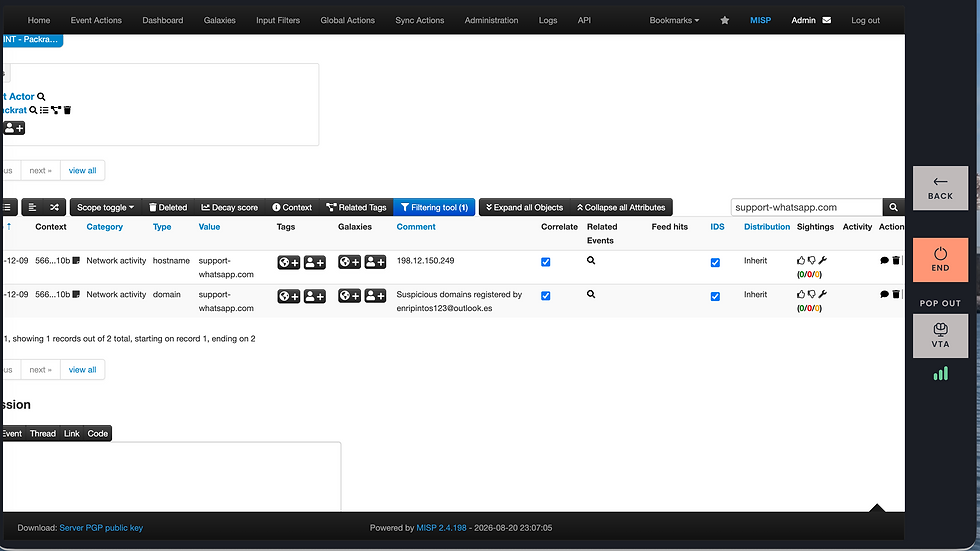
The pivot: one indicator, filtered to its context.
The honesty beat
The mistake I want to be honest about
There was a question near the end: which of three domains was NOT registered using that same email?
I filtered, got nothing back, and guessed. I guessed right — support-yahoo[.]com — but a right guess on attribution is worthless in a real queue, so I went back to do it properly. And that's when I found what had actually gone wrong.
format vs. value
I'd been searching the domains with the defang brackets in them — the [.] notation. Analysts write indicators that way so a live malicious domain isn't accidentally clicked or auto-linked. The brackets are a presentation layer. They're for humans. The value MISP actually stores is the clean support-yahoo.com. I was searching the display string instead of the stored value, so of course it returned nothing.
The moment I searched the un-defanged form, every domain filtered correctly. Three of them carried the enripintos123[@]outlook[.]es registrant in their comments; support-yahoo[.]com didn't. Now I knew the answer instead of guessing it.
Here's why that stuck with me: it's a format-versus-value bug, and it's one I've hit a hundred times cleaning messy data. Search the formatted display, and you get nothing; search the normalized value, and it works. I just hit it live, in a security tool, on my first run. The skill I've spent a decade building transferred — I just didn't recognize it until it bit me.
(To be precise, because it matters: I still display indicators defanged, brackets and all, for safety. The lesson isn't "brackets are bad." It's that the stored value is un-defanged, so that's what you search on.)
How · to prove you learned it
From one indicator to the whole stream
The module ends on the automation payoff: feeds. A feed is a continuously updated external stream of threat intelligence. MISP ships with the CIRCL OSINT feed already on — that's where my Packrat event came from — and I enabled a second, Botvrij.eu, then hit Fetch and store all feed data. MISP queued the job and new events started populating on their own.
That's the whole arc in one session: I started by reading a single event by hand, and I finished by turning on the pipe that delivers thousands automatically. Consume one indicator manually, then enable the stream that scales it. That's IoC management at scale — the thing the module opened by promising.

The payoff: an automated intelligence source, switched on.
If you run this lab, the way to show you did more than click through is to capture that arc:
The filtered attribute pivot — one indicator resolving to its IP and registrant context.
The enabled feed and the fetch confirmation — proof you turned on an automated intelligence source, not just read a slide.
Name it, and it's a line on a page. Show it, and it's a skill.
storm-to-SOC:
I spent a decade turning messy, disconnected data streams into something a decision-maker could act on. A threat feed is just another raw stream, and detection is just another forecast.
The tool changed. The question didn't. 💜
Skill: IP Reputation Analysis · MITRE D3FEND D3-IPRA · NICE Cyber Defense Analyst


Comments